
AI Workflow for Organizations: A Guide to Creating Processes on TopAgent IC
The AI Workflow on TopAgent IC helps set up automated workflows based on personal, organizational, or project scopes. Users can create an empty workflow, import from a template, complete the process, and publish it to run according to the set schedule.

AI Workflow on TopAgent IC
AI Workflow on TopAgent IC lets you set up automated workflows at the personal, organizational, or project level. Users can create a blank workflow, import from a template, finish building out the process, and publish it to run on a set schedule.
Repetitive tasks like compiling information, processing data, or generating reports take up a lot of time. As the volume grows, manual operation can easily cause delays and missed steps.
The AI Workflow feature for organizations on TopAgent IC turns these tasks into a structured process that can be reviewed, published, and reused.
1. What Is AI Workflow for Organizations on TopAgent IC?
AI Workflow lets you set up a workflow so the AI can help carry out tasks in a defined sequence and configuration. Users build the process, finalize the steps, then publish it to run.
On TopAgent IC, developed by ADT Hi-tech, workflows are organized into three scopes: Personal, Organization, or Project. Users can choose “Blank Workflow” or “Import from Template.”
AI Workflow for organizations turns a way of working that depends on memory into a process that can be managed, reviewed, and reused more consistently.
Organizations still need to define the inputs, outputs, schedule, and the steps that require human review.
2. Why Does a Repetitive Process Reduce Productivity?
Without a unified automated workflow, teams typically run into the following bottlenecks:
- Time-consuming: staff repeat the same sequence of gathering or compiling information.
- Dependent on individuals: the way the work gets done lives in the experience of whoever is responsible for it.
- Lack of consistency: different people may handle the same request in different ways.
- Easy to miss steps: recurring tasks have to be remembered and kicked off manually.
- Hard to control: the more steps there are, the harder it is to track.
- Less high-value capacity: time for analysis and creative work gets spent on operations instead.
Organizations also have to spend resources checking, fixing errors, and re-coordinating work. This is a recurring cost that’s easy to overlook when evaluating each task in isolation.
3. How Does AI Workflow Help Automate Processes?
Standardizing how work gets done
Each workflow has a defined structure, which clearly describes the steps, inputs, and outputs, instead of relying on individual habits.
Exceptions or high-risk decisions still need to be reviewed by a human.
Reducing manual kick-offs
A workflow can run on a set schedule, which fits recurring work and reduces the need to start it manually.
An important workflow shouldn’t be published until its inputs and outputs have been tested.
Organizing workflows by the right scope
Personal is for individual tasks; Organization is for shared processes; Project is for a specific team’s work. Categorizing correctly makes management easier.
Balancing speed of setup with customization
A blank workflow suits a process with specific requirements; importing from a template speeds up setup. Both still need to be tested before publishing.
4. How to Create an AI Workflow on TopAgent IC
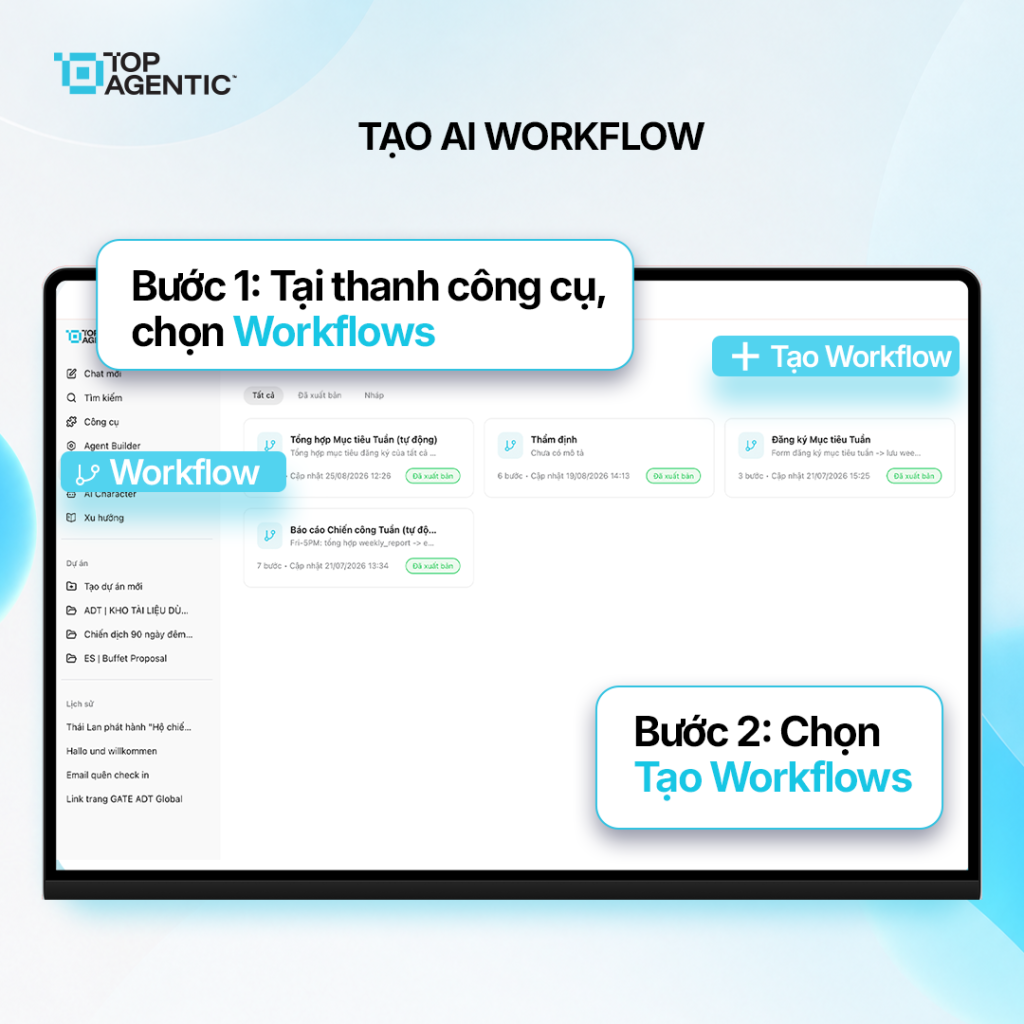
Step 1: Go to the Workflows Section
- Open the toolbar on the left side of the screen.
- Select Workflows to enter the management interface.
Step 2: Select “Create Workflow”
In the Workflow interface, select “Create Workflow” to open the setup screen.
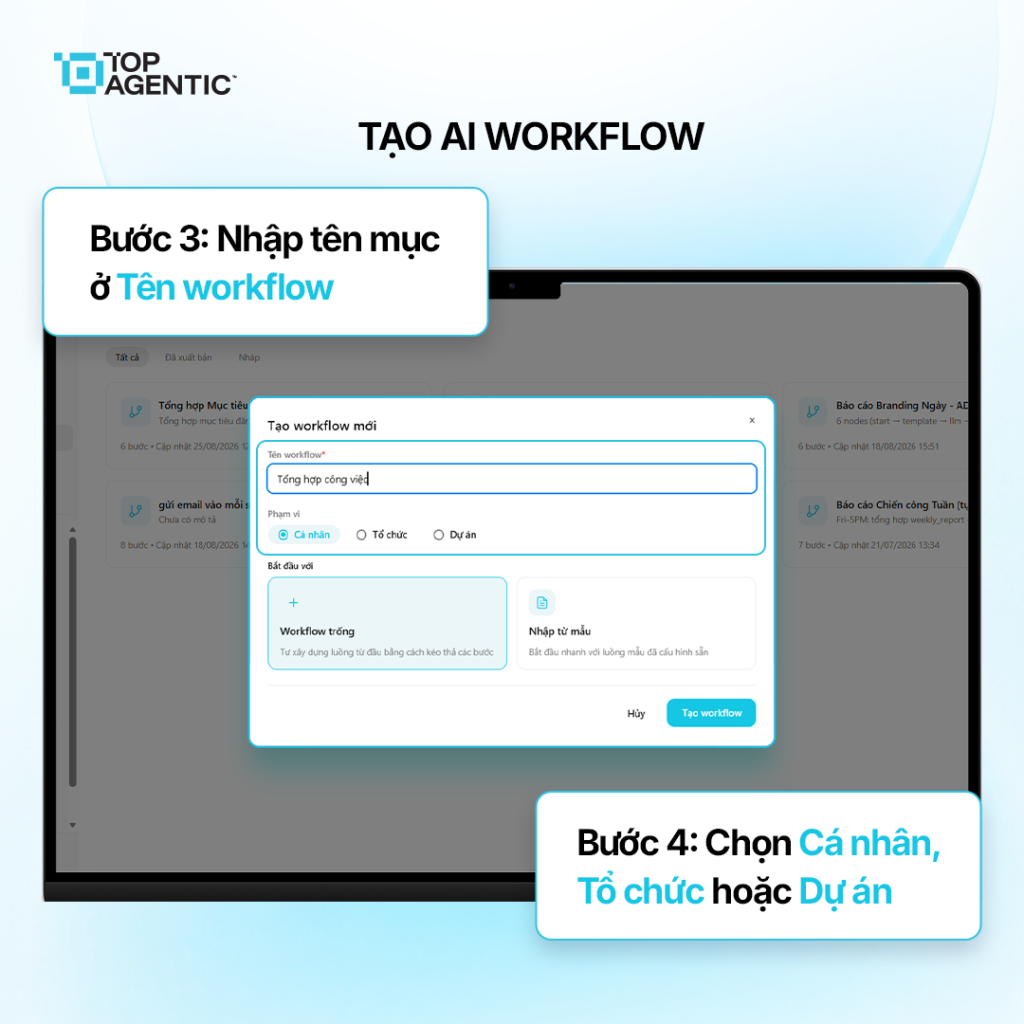
Step 3: Enter the Workflow Name
In the Workflow Name field, enter a short, descriptive name that accurately reflects the task, such as “Periodic Report Compilation.”
Step 4: Select the Scope
- Select Personal if the workflow serves individual tasks.
- Select Organization if the workflow is used across the unit.
- Select Project if the workflow is tied to a specific project.
Selecting the correct scope ensures the workflow is placed in the right context.
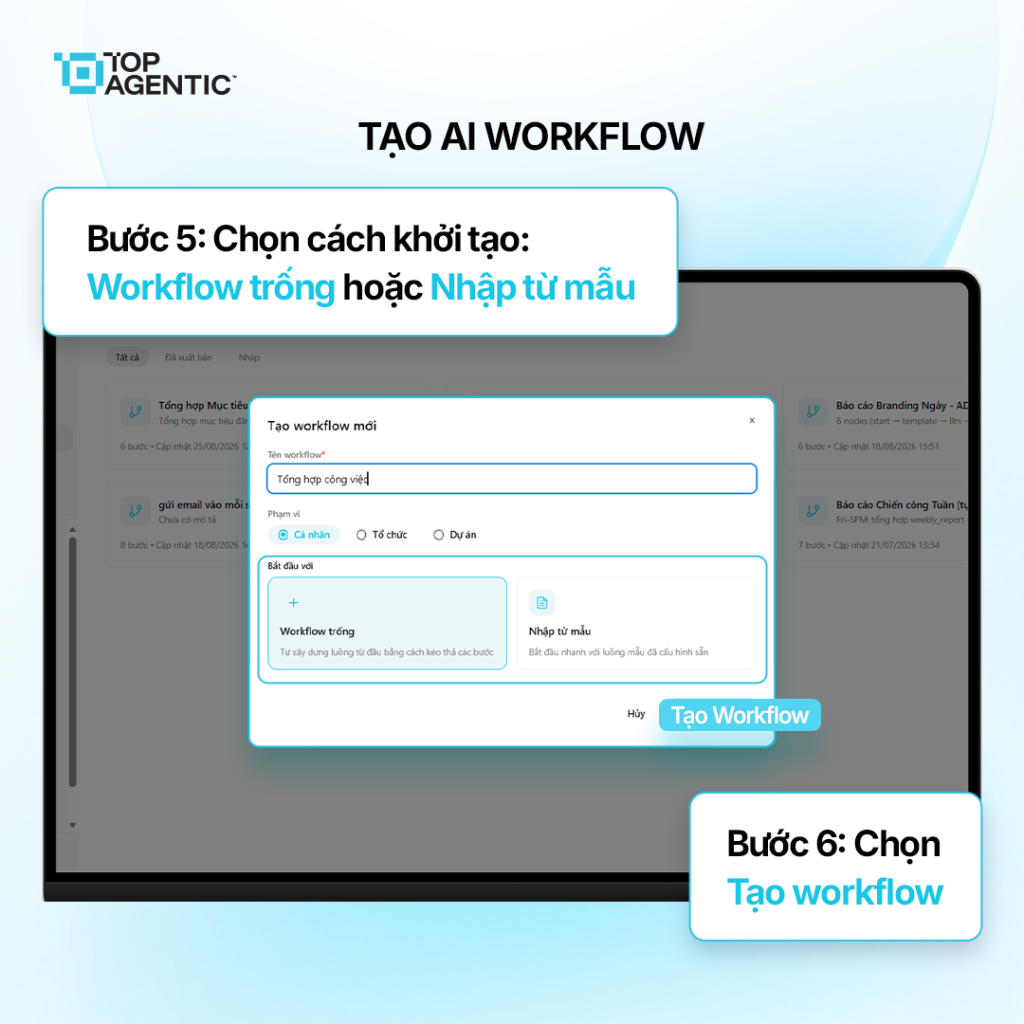
Step 5: Choose How to Initialize
- Select Blank Workflow if you want to build the flow yourself according to your specific needs.
- Select Import from Template if you want to use a pre-configured workflow.
A blank workflow suits a custom process; importing from a template allows for faster deployment.
Step 6: Initialize and Complete the Diagram
- Select “Create Workflow.”
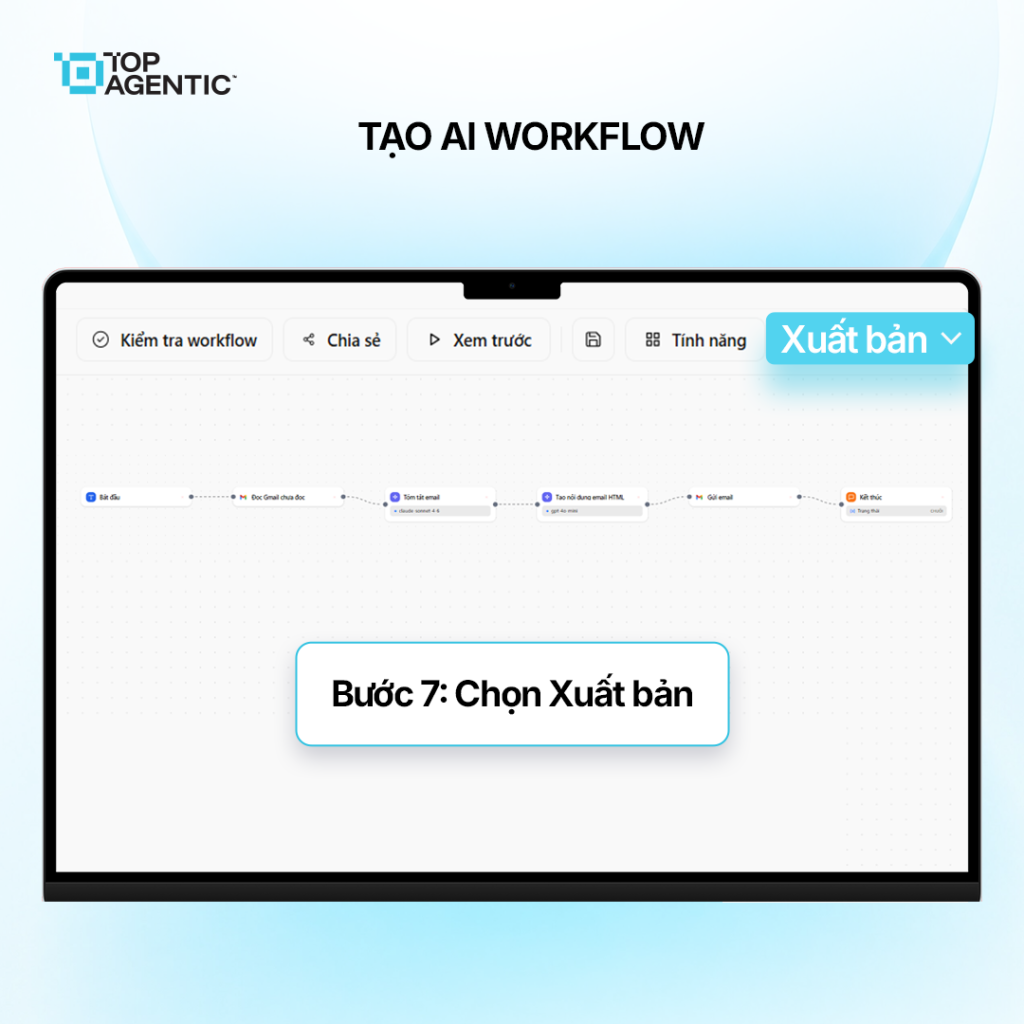
- The system generates the process diagram.
- Review and complete the steps.
Before publishing, review the inputs, sequence, outputs, and schedule carefully. It’s best to test on a small scale before rolling it out broadly.
Step 7: Publish the Workflow
Once the flow is complete, select Publish to activate the workflow according to the schedule you’ve set.
In the initial period, it’s a good idea to monitor the results and make adjustments as needed.
5. How to Choose the Right Process to Automate
Not every process should be automated right away. Organizations should prioritize tasks that:
- Occur frequently and take up a lot of manual time.
- Have a relatively clear input, sequence, and desired output.
- Change infrequently, or have identifiable exception cases.
- Produce a result that’s easy to check against specific criteria.
- Don’t require the AI to make important decisions on its own without oversight.
A small, stable, measurable process is better suited for testing than a complex, cross-departmental workflow. Evaluate time saved, error rate, and consistency before scaling up.
6. Benefits of AI Workflow for Organizations
- Fewer repetitive actions: staff spend less time on familiar operational steps.
- Maintains consistency: a workflow creates a shared structure used across multiple runs.
- Supports scheduled operation: fits reports or recurring tasks.
- Organized by need: workflows are categorized as personal, organizational, or project-based.
- Builds a foundation for a digital workforce: AI agents get built into specific workflows, rather than only acting as a Q&A tool.
The value of AI Workflow for organizations lies in its ability to address the right bottleneck. Only scale it up once you’ve defined who is responsible and how the output will be checked.
Conclusion
AI Workflow turns repetitive actions into a process that can be managed and reused. On TopAgent IC, users select the scope, the way to initialize it, complete the diagram, and publish it.
To automate processes with AI effectively, start with a clearly defined task, test on a small scale, and maintain human oversight.
Frequently Asked Questions About AI Workflow for Organizations
What is AI Workflow?
AI Workflow is a flow that lets the AI help carry out tasks in a defined sequence and configuration, within the Personal, Organization, or Project scope.
Should I choose Blank Workflow or Import from Template?
Choose Blank Workflow for a custom process; choose Import from Template to speed up setup. Both need to be tested before publishing.
When does the workflow start running?
The workflow is activated once its configuration is complete and you select Publish, after which it runs according to the set schedule.
Does AI Workflow completely replace staff?
No. People still need to define the goal, manage exceptions, check the results, and handle important decisions.
Which processes should be automated first?
Start with tasks that are frequent, have clear inputs and outputs, have few exceptions, and are easy to measure.